convert json to sobject
doc_type: reference product_doc_version: “2” tags: [components] sc_path: docs/component-library/flow-components/convert-json-to-sobject —
— title: Convert JSON to SObject slug: convert-json-to-sobject sidebar_position: 5 —
-
Category
- Data
- Integration
- Transform
-
Flow Icon

Overview
This component converts a JSON string into a Salesforce SObject. You specify the target SObject type and provide a JSON payload with keys matching field API names. The component parses the JSON and returns a populated SObject instance for Flow or Apex to process (e.g., create or update).
Notes: This action does not perform DML. It only returns a populated SObject so your Flow (or subsequent Apex) can decide whether to create, update, validate, or branch.**
Inputs
- jsonString
A JSON string representing field/value pairs for the target SObject.- Keys should be Salesforce field API names (e.g.,
AccountId,CloseDate,Custom_Field__c). - Nested JSON is not automatically dereferenced into related records—use flat key/value pairs for direct fields.
- Keys should be Salesforce field API names (e.g.,
- sobjectType
The API name of the SObject to construct (e.g.,Account,Opportunity,Case,CustomObject__c).
Output
- sObjectOut
An SObject of the specified type, populated from the JSON. The record is not saved; use Flow (Create/Update) or Apex DML to persist.
Behavior & Field Handling
- Parsing & Mapping
- The action deserializes
jsonStringand maps keys to fields on the specifiedsobjectType. - Unknown or misspelled field API names will not map and may raise an error.
- The action deserializes
- Data Types
- Text/Number/Boolean: Parsed directly when valid.
- Date/DateTime: Expects ISO-8601-style strings (e.g.,
2025-07-31,2025-07-31T14:35:00.000Z).- Milliseconds are safely handled; if present they are removed before returning a
Z-suffixed UTC value.
- Milliseconds are safely handled; if present they are removed before returning a
- Lookup/ID: Provide a valid 15 or 18-char Salesforce ID.
- Picklists: Provide a valid picklist value (case-sensitive rules depend on org settings).
- No DML
- This component returns the SObject; it does not call
insert/update. Flow builder allows you to insert your own DML chains using the returned SObject.
- This component returns the SObject; it does not call
- Errors
- Throws
ConvertoSObjectExceptionon invalid input (e.g., malformed JSON, invalid field/value formats).
- Throws
Example Scenario - Creating Opportunities From External Orders
Scenario Overview
A Salesforce org receives order data from an external e-commerce platform. The platform sends JSON payloads containing order details. These need to be converted into Salesforce Opportunity records for pipeline tracking
Implementation with Convert JSON to SObject component 1. Flow Setup for Order Processing: - Create a Salesforce flow triggered when a new order JSON payload is received (e.g., through an Apex action or Platform Event).
-
Add Convert JSON to SObject Component - Incorporate the Convert JSON to SObject component into the flow to transform the incoming JSON into a Salesforce SObject.
-
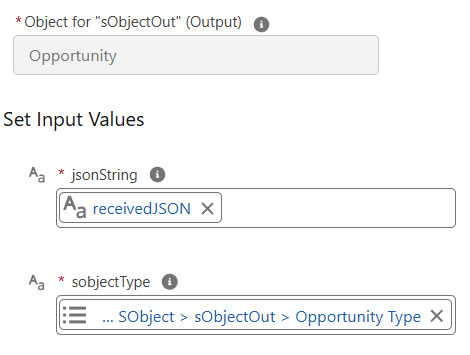
Configuring Input: -
jsonStringis set to the JSON payload received from the external system -sObjectTypeis set to Opportunity
-
Executing JSON to SObject Conversion:
- The component parses the JSON string and returns a populated Opportunity SObject with mapped field values. -
Utilizing Converted Data:
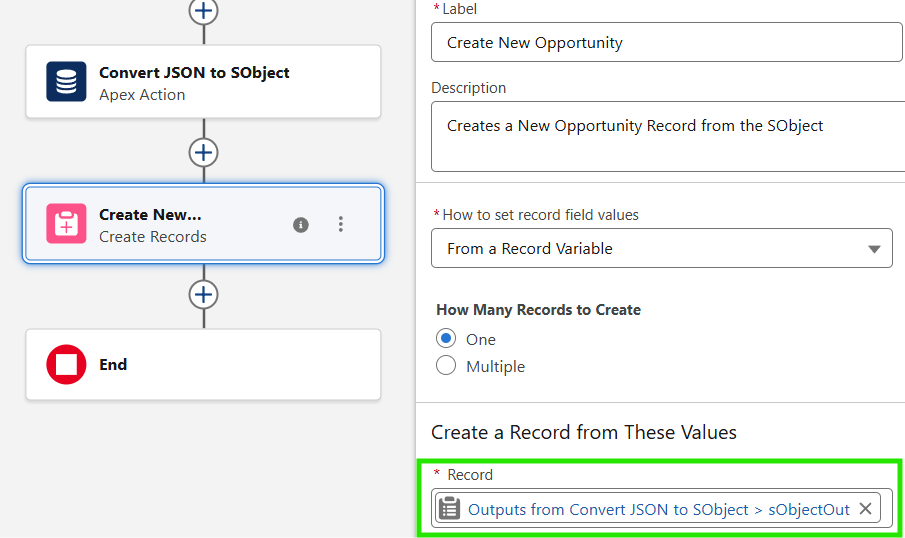
- ThesObjectOutoutput is passed to a Create Records element, which inserts the Opportunity into Salesforce. Additional Flow logic can validate fields or branch on business rules before committing the record.
Need help?
Talk to the Plinqx team about setup, integrations, or licensing.