Custom Transform (Apex)
Available: Base **Developer feature (Apex required)
Overview
When the built-in Formula, Utility Flows or standard mapping actions aren’t enough, you can plug in custom Apex transforms.
A custom transform is a small Apex class that implements the Plinqx transform_Interface:
Your class implements PlinqxV2.transform_Interface.itransform_Interface and provides the logic in doTransform.
The transformation engine will pass both the Source Object and the Source value as input object parameters to your class.
When to use
-
You need logic that is easier/clearer in code than in a formula.
-
You must call utility methods or perform complex parsing.
-
You want a reusable transformation used by multiple mappings.
Contract
-
Signature:
Object doTransform(Object objRecord, Object value) -
Input: The record context (may be
null) and the source value for the field/mapping (may benull). -
Output: The transformed value (return the desired type; engine will coerce to the mapping’s target type when possible).
-
Side-effects: Avoid DML/callouts; keep transforms pure and fast.
-
Sharing: Use
with sharingunless you have a specific reason not to.
Implementation example
The example below formats a phone number into (XXX) XXX-XXXX. It implements the V2 transform interface and returns the original value if the input is not 10 digits.
```apex public class sample_designer_transform extends PlinqxV2.transform_Interface.transform_InterfaceBase implements PlinqxV2.transform_Interface.itransform_Interface {
/**
 * @description Formats a phone number to (XXX) XXX-XXXX format.
 * @param objRecord The record context (unused in this implementation)
 * @param value The phone number value to transform
 * @return The formatted phone number or original value if invalid
 */
public Object doTransform(Object objRecord, Object value) {
    if (value == null) {
        return null;
    }

    String phone = String.valueOf(value).replaceAll('[^0-9]', '');

    if (phone.length() == 10) {
        return '(' + phone.substring(0, 3) + ') ' +
               phone.substring(3, 6) + '-' +
               phone.substring(6);
    }

    return value;
} }
```
Tips
-
Handle nulls defensively.
-
Validate and return the correct type (e.g.,
String,Decimal,Boolean,Date, etc.). -
Prefer small, single-purpose transforms you can compose.
Registering the class
The mapping engine activates your class via Type.forName(className):
- In your mapping configuration, set the Class Name to your Apex class
- The class must be
publicorglobaland accessible to the running user/context.
Unit test requirement
Every custom transform must ship with a unit test.
Example:
```apex
@IsTest private class sample_designer_transformTest {
/**
 * @description Tests doTransform with a valid 10-digit phone number.
 *              Verifies the phone is formatted to (XXX) XXX-XXXX format.
 */
@IsTest
static void doTransform_validTenDigitPhone_returnsFormattedPhone() {
    // Arrange
    sample_designer_transform transformer = new sample_designer_transform();
    String inputPhone = '1234567890';

    // Act
    Object result = transformer.doTransform(null, inputPhone);

    // Assert
    System.assertEquals('(123) 456-7890', result, 'Should format 10-digit phone to (XXX) XXX-XXXX');
}

/**
 * @description Tests doTransform with a phone number containing special characters.
 *              Verifies special characters are stripped and phone is formatted correctly.
 */
@IsTest
static void doTransform_phoneWithSpecialCharacters_stripsAndFormats() {
    // Arrange
    sample_designer_transform transformer = new sample_designer_transform();
    String inputPhone = '(123) 456-7890';

    // Act
    Object result = transformer.doTransform(null, inputPhone);

    // Assert
    System.assertEquals('(123) 456-7890', result, 'Should strip special chars and format correctly');
}

/**
 * @description Tests doTransform with a phone number containing dashes and spaces.
 *              Verifies the phone is cleaned and formatted correctly.
 */
@IsTest
static void doTransform_phoneWithDashesAndSpaces_stripsAndFormats() {
    // Arrange
    sample_designer_transform transformer = new sample_designer_transform();
    String inputPhone = '123-456-7890';

    // Act
    Object result = transformer.doTransform(null, inputPhone);

    // Assert
    System.assertEquals('(123) 456-7890', result, 'Should strip dashes and format correctly');
}

/**
 * @description Tests doTransform with a null value.
 *              Verifies null is returned when input is null.
 */
@IsTest
static void doTransform_nullValue_returnsNull() {
    // Arrange
    sample_designer_transform transformer = new sample_designer_transform();

    // Act
    Object result = transformer.doTransform(null, null);

    // Assert
    System.assertEquals(null, result, 'Should return null when input is null');
}

/**
 * @description Tests doTransform with a phone number shorter than 10 digits.
 *              Verifies original value is returned unchanged.
 */
@IsTest
static void doTransform_phoneTooShort_returnsOriginalValue() {
    // Arrange
    sample_designer_transform transformer = new sample_designer_transform();
    String inputPhone = '12345';

    // Act
    Object result = transformer.doTransform(null, inputPhone);

    // Assert
    System.assertEquals('12345', result, 'Should return original value when less than 10 digits');
}

/**
 * @description Tests doTransform with a phone number longer than 10 digits.
 *              Verifies original value is returned unchanged.
 */
@IsTest
static void doTransform_phoneTooLong_returnsOriginalValue() {
    // Arrange
    sample_designer_transform transformer = new sample_designer_transform();
    String inputPhone = '12345678901';

    // Act
    Object result = transformer.doTransform(null, inputPhone);

    // Assert
    System.assertEquals('12345678901', result, 'Should return original value when more than 10 digits');
}

/**
 * @description Tests doTransform with an empty string.
 *              Verifies original value is returned unchanged.
 */
@IsTest
static void doTransform_emptyString_returnsOriginalValue() {
    // Arrange
    sample_designer_transform transformer = new sample_designer_transform();
    String inputPhone = '';

    // Act
    Object result = transformer.doTransform(null, inputPhone);

    // Assert
    System.assertEquals('', result, 'Should return empty string unchanged');
}

/**
 * @description Tests doTransform with an objRecord parameter provided.
 *              Verifies the objRecord is ignored and phone is still formatted.
 */
@IsTest
static void doTransform_withObjRecord_ignoresRecordAndFormatsPhone() {
    // Arrange
    sample_designer_transform transformer = new sample_designer_transform();
    Map<String, Object> objRecord = new Map<String, Object>{
        'Name' => 'Test Record',
        'Phone' => '9999999999'
    };
    String inputPhone = '1234567890';

    // Act
    Object result = transformer.doTransform(objRecord, inputPhone);

    // Assert
    System.assertEquals('(123) 456-7890', result, 'Should ignore objRecord and format phone from value parameter');
}
}
```
Why tests matter
-
Enforce correct behaviour across orgs/environments.
-
Prevent regressions when transforms evolve.
-
Required for deployment in many pipelines and managed-package contexts.
Usage in a mapping
-
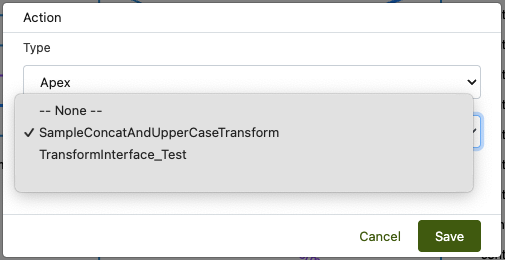
Open your Mapping → add an Action of type Apex (name may vary in UI).
-
Select the Class Name (only Apex classes that implement itransform_Interface will be listed
*implements PlinqxV2.transform_Interface.itransform_Interface*). -
Select the Active checkbox.
-
Click Save (the engine will call
doTransform(objRecord, value)during the mapping).
Best practices
-
Pure functions: No DML/callouts; return quickly.
-
Type safety: Cast and validate; throw a clear exception for unsupported input.
-
Null handling: Decide and document whether
nullreturnsnullor a default. -
Idempotency: Same input → same output.
-
Logging: Only log when essential; avoid noisy debug in production runs.
Troubleshooting
-
Type.forNamereturns null
Use the fully-qualified class name with namespace (e.g.,yourNs.MyTransform). -
Invalid typeerror
Ensure the class is public/global, compiled, and in the same org. -
Wrong output type
Return the actual type expected by the target mapping (e.g., aDecimalfor numeric fields). -
Unexpected nulls
Add guards indoTransformand unit tests for null/empty inputs.
Need help?
Talk to the Plinqx team about setup, integrations, or licensing.